
How to find your Samsung Watch model number
A short guide to help you find the model number for your Samsung Watch.
-
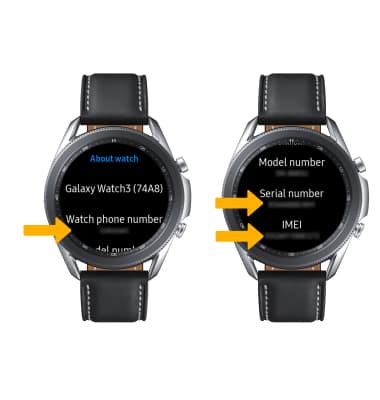
Check the Watch Settings:
- On your Samsung Watch, navigate to the home screen by pressing the physical button or tapping on the screen.
- Scroll down or swipe up to access the app drawer.
- Find and tap on the "Settings" app. It typically looks like a gear icon.
- Scroll down and select "About watch" or a similar option.
- Look for the "Model number" or "Model" entry. The model number of your Samsung Watch should be listed here.
-
Check the Back of the Watch:
- Turn your Samsung Watch over so that the backside is facing you.
- Look for any text or labels engraved on the back of the watch.
- The model number is often printed or engraved on the back casing of the watch. It might be a combination of letters and numbers.
-
Check the Original Packaging:
- If you have the original box that your Samsung Watch came in, check it for a label or sticker that displays the model number.
- The model number is usually printed on the side or bottom of the box.
-
Check the Samsung Wearable App (For Connected Watches):
- If your Samsung Watch is connected to a smartphone, you can use the Samsung Wearable app to find the model number.
- Open the Samsung Wearable app on your smartphone.
- Select your connected Samsung Watch from the list of devices.
- Look for the device information section, where you should find the model number listed.
-
Check the Manufacturer's Website:
- If you're still unable to find the model number using the methods above, you can visit Samsung's official website.
- Navigate to the support section and look for a page where you can enter details about your device to find its model number. You might need to enter information such as the device type (watch) and possibly other details.
By following these steps, you should be able to locate the model number of your Samsung Watch easily.